How to Build a Website with AI: A Beginner's Guide
Learn how to build a website with AI in five simple steps. From your first prompt to the final design, discover how Rebel Vibe makes website creation easy, no coding required.
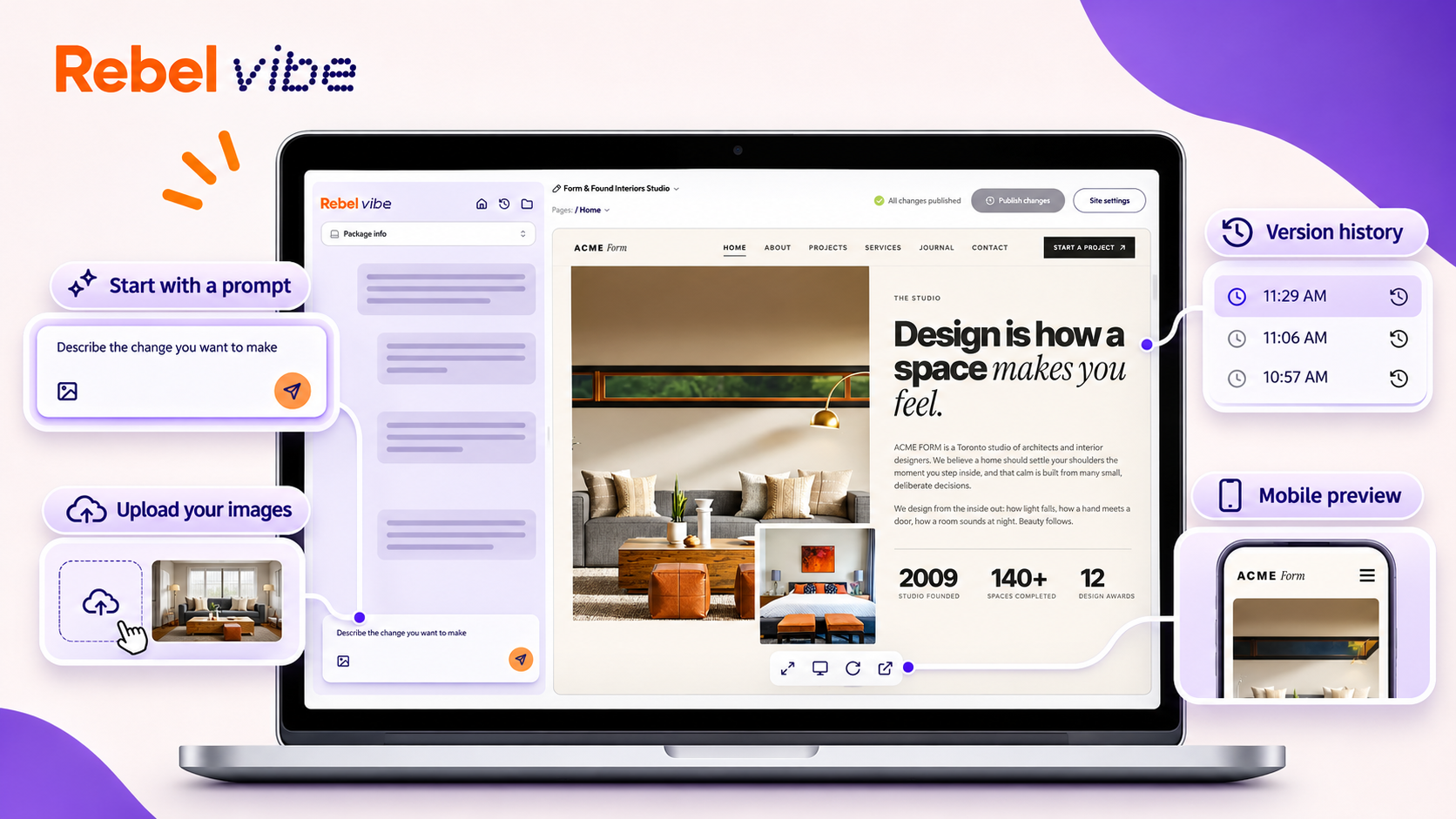
Building a website doesn't have to be complicated. With an AI website builder, you can turn a simple idea into a website in minutes, without coding or design experience.
Whether you're starting a business, creating a portfolio, or bringing a personal project online, AI can help you get started faster.
In this guide, we'll walk you through how to build a website with AI using Rebel Vibe, from writing your first prompt to customizing your design and getting ready to publish.
What is an AI website builder?
An AI website builder is a tool that creates a website based on your instructions. Instead of starting from scratch, you describe what you want, and AI generates an initial design with text, images, and sections.
From there, you can make changes by simply telling the AI what you'd like to adjust. Think of it as having a conversation about your website rather than building every piece yourself.
Step 1: Start with your idea
Before opening a website builder, think about what you want your website to accomplish.
You don't need a detailed business plan or a complete design mapped out. A few simple questions can help you get started:
- What's the purpose of your website? Are you promoting a business, showcasing your work, or sharing information?
- Who's your audience? Think about the people you want to visit your website.
- What information matters most? Your services, story, contact details, or examples of your work?
- How should it feel? Professional and modern? Colourful and creative? Simple and welcoming?
These details give the AI a better understanding of what you're trying to create.
For example, a photographer might want a clean, image-focused portfolio, while a local bakery might prefer something warm, colourful, and inviting.
The more context you provide, the more useful your first website design can be.
Step 2: Describe your website to AI
Now it's time to bring your idea to life.
With Rebel Vibe, you can start building a website by describing what you want in a chat.
If you already have a Rebel account, log in, select Products, and open your AI Website Builder. From there, you'll see the option to click Add site to begin.
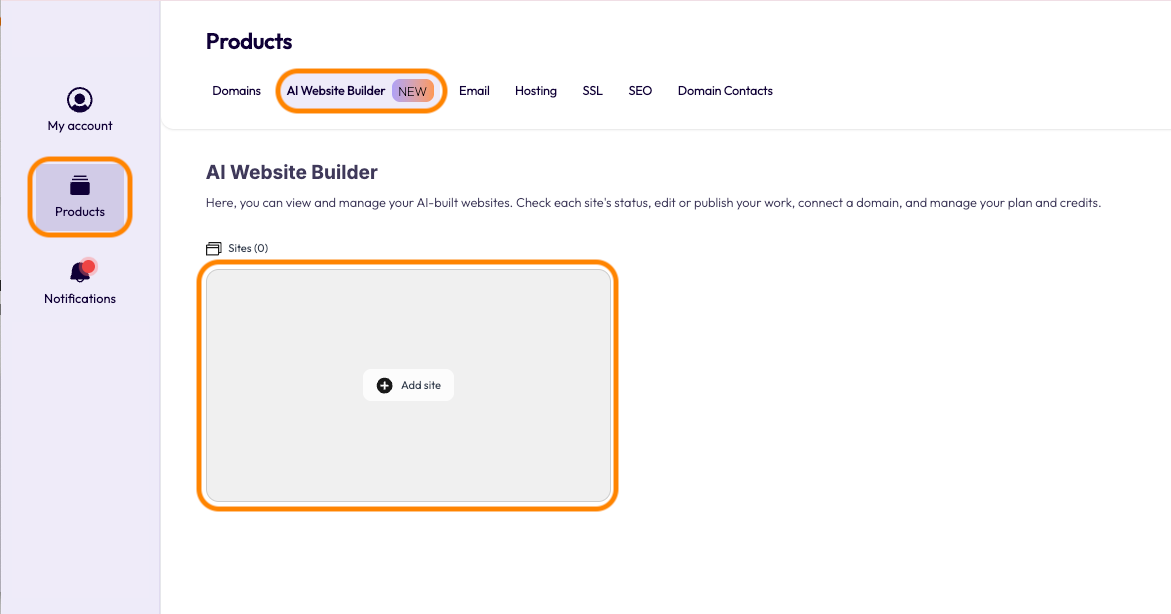
You'll see a chat box asking you to describe the website you want to create.
This is where you tell AI about your business, project, or idea. There's no special language to learn. Simply explain what you want as though you're talking to another person.
Not sure what to write? Try this example prompt:
"Build a website for [business name], a [type of business] located in [city]. We offer [products or services] to [target audience]. I want the website to feel [style or mood] and use [preferred colours]. Include a homepage, an About section, our services, and contact information."
You can make your description as simple or detailed as you'd like.
Once you're happy with your instructions, click Start building and let Rebel Vibe get to work.
A quick tip: Be specific about what makes your business different. If you're a family-owned business, serve a particular community, or specialize in something unique, mention it! Those details can help make your website feel more personal.
Step 3: Watch your website come together
Here's where things get fun.
After submitting your description, Rebel Vibe uses AI to generate the first version of your website. Within minutes, you'll have a design you can explore, complete with text, images, and sections based on your instructions.
Rather than spending hours deciding where every heading, image, and button should go, you have a starting point ready to review.
Take some time to explore what AI has created.
Does the homepage communicate what your business does? Are your services easy to find? Does the design match the style you had in mind?
You might love the first version, or you might immediately spot a few things you'd like to change.
That's completely normal. Your first website is a starting point, not a finished product.
Step 4: Make it yours with simple instructions
One of the biggest advantages of building a website with AI is how easily you can make changes.
With Rebel Vibe, you don't need to navigate complicated design menus or edit code. You can simply tell the AI what you'd like to change using the chat box.
Want to update a heading? Change the colour scheme? Add another section?
Just ask.
Here are a few examples of instructions you could use:
To change your website's text:
"Make the homepage introduction shorter and more welcoming. Keep the focus on our locally owned business."
To update the colours:
"Change the website's buttons to dark green and keep the background white."
To adjust the layout:
"Move the Services section above the About Us section on the homepage."
To add new information:
"Add a section called 'Areas We Serve' and include Ottawa, Kanata, and Stittsville."
You can even upload your own images and ask Rebel Vibe to place them on your website.
For example:
"Replace the main homepage image with the photo I just uploaded."
The key is to be clear about what you want to change and where you'd like the change to happen.
And don't worry about getting everything right the first time. Rebel Vibe includes version history, so you can revisit earlier designs and restore a previous version if you change your mind.
For more ideas, check out our guide to prompting with Rebel Vibe.
Step 5: Preview, review, and publish your website
You've created your website and made it your own. Now it's time to make sure everything looks and works the way you want.
Before sharing it with the world, take a few minutes to review the details.
Check your content. Make sure your business name, services, contact information, and other important details are accurate. AI can help draft your content, but you know your business best.
Review the mobile version. Your visitors may be browsing on their phones, so check how your text, images, and sections appear on smaller screens. Rebel Vibe lets you switch between desktop and mobile previews while editing.
Test your links. Click through your website as though you're a first-time visitor. Can you easily find the information you're looking for?
Ask for a second opinion. Sometimes a fresh pair of eyes can catch something you've missed. Rebel Vibe provides a test website URL that you can share with others for feedback.
Once you're ready, you can publish your website to your own custom domain with an eligible paid Rebel Vibe plan.
A custom domain, like yourbusiness.ca, gives visitors a memorable address where they can find you online.
And remember, publishing doesn't mean you're finished forever. You can continue updating your website as your business grows.
Your website starts with an idea
Building a website used to feel like a major undertaking. Today, it can begin with something as simple as a sentence.
AI website builders are making it easier for people to turn their ideas into something real, without needing to become designers or developers along the way.
Whether you're starting a business, building your personal brand, or creating a space to share your work, you don't have to figure out every technical detail before getting started.
You just need to know what you want to create.
Have an idea? Let's see what it looks like. Try Rebel Vibe, our AI website builder, and turn your words into a website in minutes.