Can you really build a website with AI without coding?
Discover how AI website builders compare to coding or traditional drag-and-drop tools and make website creation easier than ever.

The short answer? Yes. You can now create an entire website without writing a single line of code, and you don't even need to know much about web design.
From traditional coding to drag-and-drop editors, website building has come a long way. Now, AI website builders are making the process even simpler by letting you describe what you want in everyday language.
But how does it actually work, and what makes AI different from the website builders we're already familiar with?
Let's take a look.
How website building has changed
Not too long ago, creating a website usually meant knowing how to code or hiring someone who did.
Developers used programming languages like HTML, CSS, and JavaScript to create the structure, design, and functionality of a website. While this offered plenty of flexibility, it also required technical knowledge, time, and often a bigger budget.
Then came website builders.
Platforms with pre-designed templates and drag-and-drop editors made website creation more accessible. Instead of writing code, users could choose a template, add text boxes, upload images, and move elements around to create their own design.
This was a big step forward, especially for small businesses and people creating their first websites.
But there was still a learning curve.
You needed to choose the right template, understand how the editor worked, arrange your content, and make sure everything looked good across different screen sizes.
Now, AI is introducing another way to build.
Rather than manually designing each section, you can simply explain what you have in mind and let AI generate a starting point.
Drag-and-drop vs. AI website builders: What's the difference?
Both drag-and-drop and AI website builders make it possible to create websites without coding. The biggest difference is how you interact with them.
With a drag-and-drop website builder, you're responsible for arranging the design. You choose elements, move them into place, adjust their appearance, and build your pages visually.
With an AI website builder, you describe what you want, and the AI helps create the design for you.
For example, imagine you're opening a photography business.
- Using a traditional drag-and-drop builder, you might choose a portfolio template, add a photo gallery, create an About page, and manually adjust the layout until everything looks right.
- With a conversational AI website builder, you could simply type:
"Create a modern photography portfolio with a minimalist design, a homepage showcasing my work, an About section, and contact information. Use neutral colours and large images."
The AI uses your description to generate an initial website, giving you something to review and refine.
Here's how the two approaches compare:
| Drag-and-drop builders | AI website builders |
|---|---|
| Start with a template or blank page | Start with a written description |
| Manually arrange website elements | AI generates an initial layout |
| Edit using visual tools and menus | Request changes using natural language |
| You create and organize much of the content | AI can help draft and organize content |
| More direct visual control | Less manual design work to get started |
Neither approach is necessarily better for everyone. Some people enjoy having direct control over every design element, while others prefer describing their ideas and letting AI handle the initial work.
The right choice depends on how you like to work and what you want to build.
How does AI build a website from a simple description?
It might seem complicated behind the scenes, but the experience itself is surprisingly straightforward.
- AI website builders use your instructions, often called prompts, to understand the type of website you're trying to create.
- A prompt can include details about your business, the people you want to reach, the information you'd like to share, and the overall look and feel.
- From there, AI can help generate the website's structure, content, and visual design. And unlike a traditional template, you're not limited to making changes through a design editor.
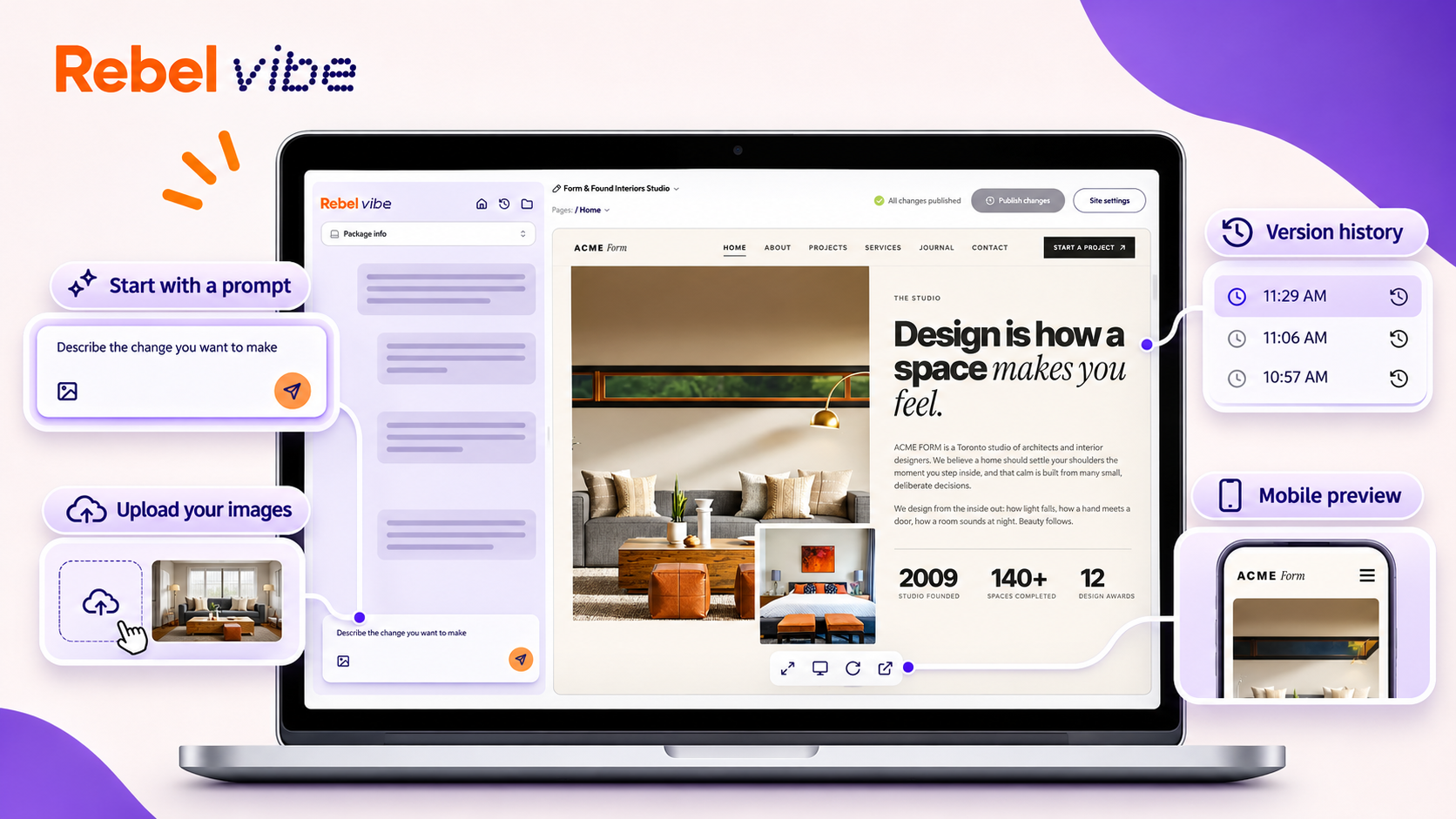
With Rebel Vibe, you can continue the conversation after your website is generated.
- Want to make the homepage more colourful? Ask.
- Need to move your services higher up the page? Just describe the change.
- Think the introduction sounds too formal? Tell AI to make it more conversational.
- You can even upload your own photos and explain where you'd like them to appear.
It's a different way of approaching website design, one that focuses more on your ideas and less on the technical steps needed to bring them to life.
Do you still need design skills to build a good website?
Not necessarily, but having a clear idea of what makes a website useful can still help.
AI can generate a layout, suggest colours, and organize your content, but you know your business and audience better than anyone. Think about the websites you enjoy visiting. Chances are, they're easy to navigate, visually appealing, and make it simple to find information.
Those same principles apply when building with AI. A few things are worth keeping in mind:
- Keep your message clear. Visitors should understand what your website is about within a few seconds.
- Make navigation simple. Important information should be easy to find without clicking through too many pages.
- Use relevant images. Real photos of your business, products, or work can help make your website more personal.
- Check the mobile experience. Make sure your content looks good and is easy to read on smaller screens.
- Review your information. AI can help write content, but you'll still want to verify important details before publishing.
You don't need to become a designer to make these decisions. A little attention to the visitor experience can go a long way.
Does AI do everything for you?
AI can take care of much of the initial website creation, but there's still an important role for you. Think of AI as a tool that helps bring your ideas to life, rather than something that knows everything about your business automatically. It can suggest a headline, but you decide whether that headline represents your brand. It can create a layout, but you decide whether visitors can easily find what they need. And while it can generate a starting point in minutes, you may still want to spend time refining the details.
The good news is that you don't need technical knowledge to make those improvements. With Rebel Vibe, you can request changes through chat, preview your website on desktop and mobile, and use version history to revisit earlier designs. You're still in control of the final result, just without having to build every element manually.
Is an AI website builder right for you?
If you've been putting off creating a website because you don't know how to code, aren't comfortable with design tools, or simply don't have the time, an AI website builder could be a good place to start.
It's particularly useful for people who have a clear idea of what they want to share online but aren't sure how to turn that idea into a website. And you don't need to have everything figured out before you begin. You can start with a basic description, see what AI creates, and improve your website as you go.
For more guidance, check out our beginner's guide to building a website with AI.
No coding? No problem.
Creating a website no longer has to mean learning programming languages or spending hours arranging design elements.
Drag-and-drop builders made website creation more accessible, and AI is taking that accessibility a step further.
Now, getting started can be as simple as describing your idea.
Whether you're launching a business, showcasing your work, or creating something entirely new, AI gives you another way to bring your ideas online.
You bring the idea. Rebel Vibe helps build the website.
Try Rebel Vibe for free and see what you can create, no coding required.